#06 What is Shell?
#06 What is Shell?
What is Shell?
- အားလုံးပဲ မင်္ဂလာပါဗျာ။ ကျွန်တော် ဒီ post လေးမှာတော့
shellအကြောင်းလေးကို ပြောပြချင်ပါတယ်။
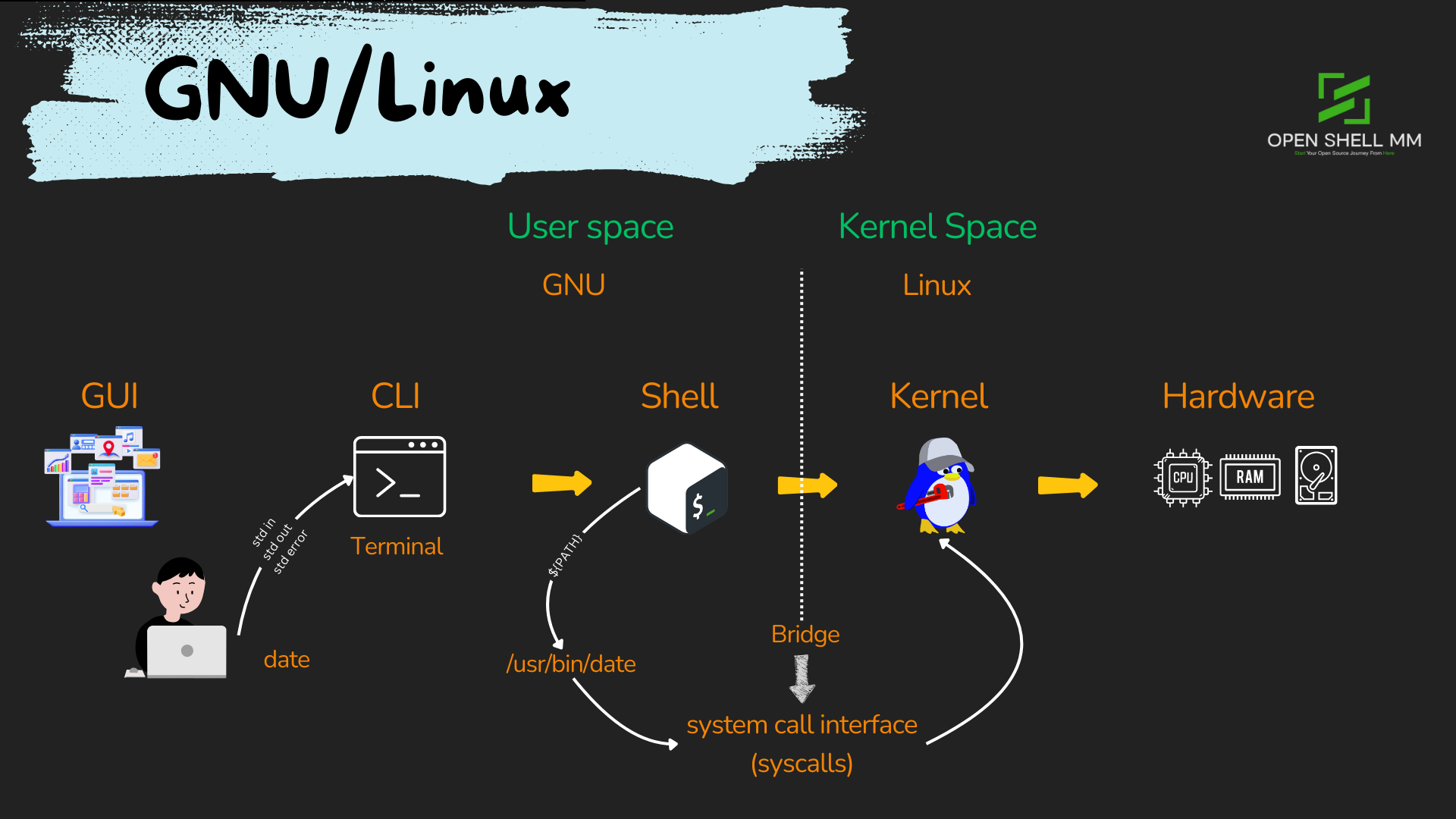
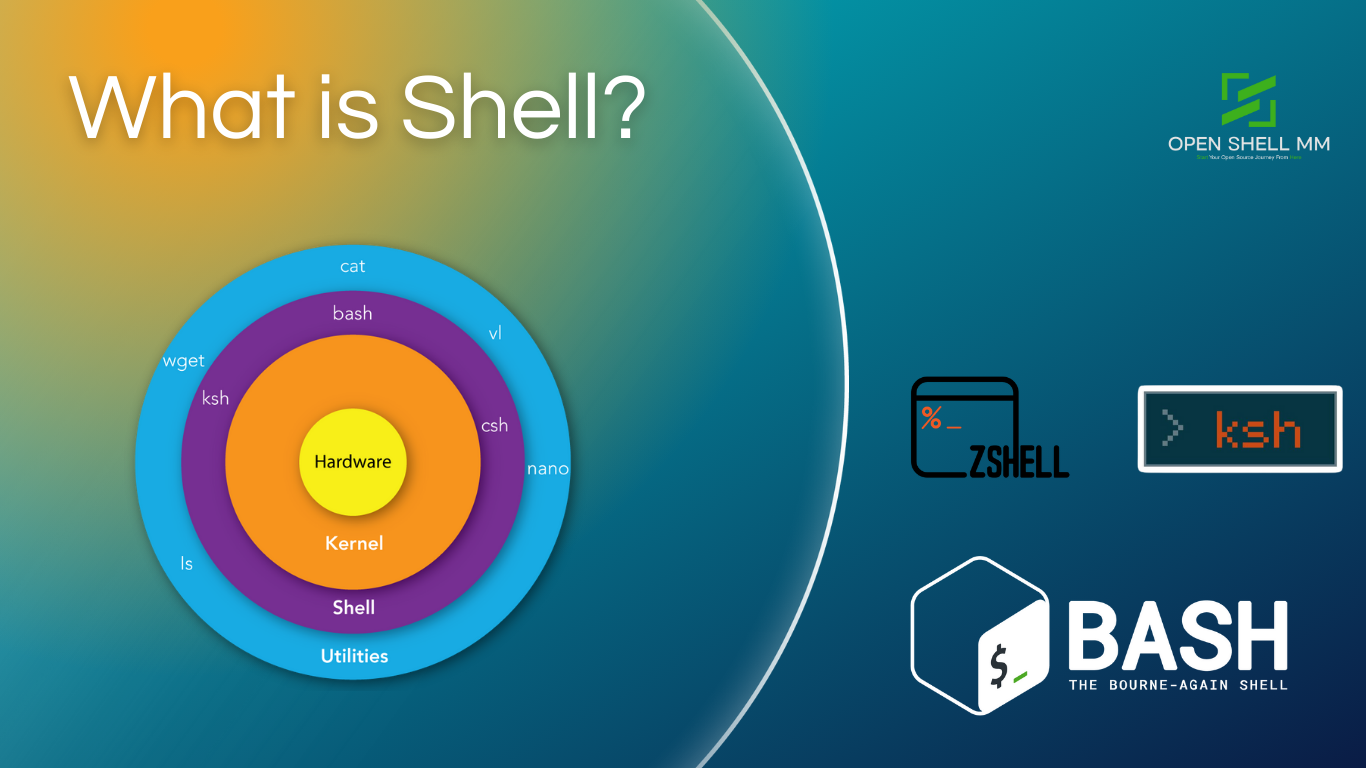
- Shell သည် command line interpreter ဖြစ်ပါတယ်။ Linux system ကို အသုံးပြုနေတဲ့ user နဲ့ kernel ကြားထဲမှာ interpreting ပြုလုပ်ပေးတဲ့ program လေး တစ်ခုပဲ ဖြစ်ပါတယ်။
- ဆိုလိုတာက user က command တွေ run ချင်တဲ့အခါ၊ system resources တွေကို manage ပြုလုပ်ချင်တဲ့အခါ shell ကနေ တစ်ဆင့် linux kernel ကို ခိုင်းစေရတာ ဖြစ်ပါတယ်။ Kernel ကမှ တစ်ဆင့် hardware တွေကို ထပ်မံ ခိုင်းစေမှာ ဖြစ်ပါတယ်။
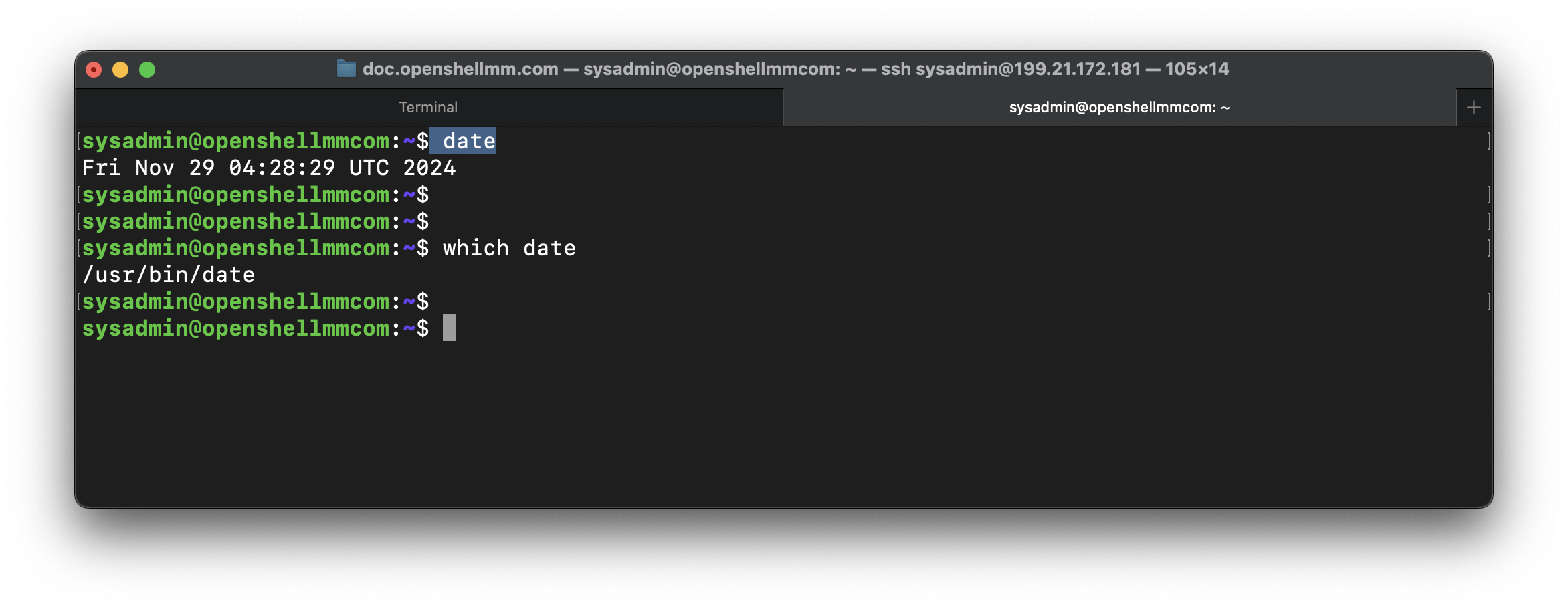
- ဥပမာ user က date and time စစ်ချင်တဲ့အခါ terminal မှာ
datecommand ကို ရိုက်ပြီး အလွယ်တစ်ကူ စစ်နိုင်ပါတယ်။ ဒါပေမဲ့ kernel ကdatecommand ကို တန်းပြီးနားလည်တာ မဟုတ်ပါဘူး။ kernelတစ်ကယ်နားလည်တာက/usr/bin/dateဆိုတဲ့Clanguage ကို အသုံးပြုပြီးရေးထားတဲ့ compiled ပြုလုပ်ထားပြီးသား executable binary file လေးကို ဘဲ နားလည်တာ ဖြစ်ပါတယ်။ အဲ့ဒီ file လေးကို တစ်ကယ် execute ပြုလုပ်ပေးတာကshellက ပြုလုပ်ပေးနေတာ ဖြစ်ပါတယ်။
- ဒါဆိုရင်
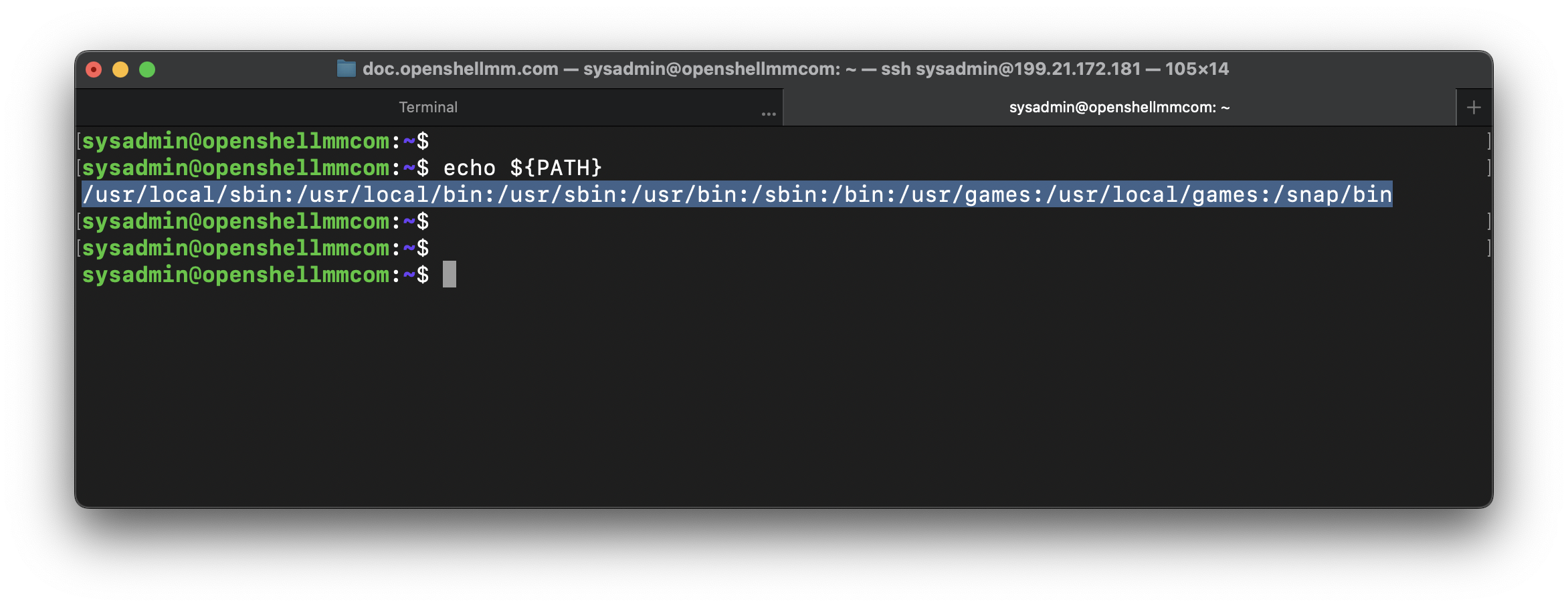
shellရဲ့ တာဝန်က user execute ပြုလုပ် လိုက်တဲ့commandbinary file တွေကို ရှာဖွေ execute ပြုလုပ်ပေးတာ ဖြစ်ပါတယ်။ shellက environment variable တစ်ခုဖြစ်တဲ့ ${PATH} မှာ သတ်မှတ်ထားတဲ့ directory path လမ်းကြောင်းတွေမှာ user ရိုက်သမျှ command တွေကို ရှာဖွေ execute ပြုလုပ်ပေးနေမှာ ဖြစ်ပါတယ်။- Linux system တော်တော်များများမှာ command binary file အများစုကို
/usr/bin/usr/sbin//usr/local/bin/usr/local/sbin/bin/sbinစတဲ့ directory path လမ်းကြောင်းတွေမှာ အများဆုံး သိမ်းပါတယ်။
-
အပေါ်က example ကို ကြည့်ကြည့်ပါ။ Directory path တစ်ခုနဲ့ တစ်ခုကြားမှာ
:လေး ခြားပြီး ရေးထားတာကို တွေ့ပါလိမ့်မယ်။ -
command တစ်ခုရဲ့ binary file location ကို သိချင်တယ်ဆိုရင်
whichcommand ကို အသုံးပြုပြီး စစ်ကြည့်နိုင်ပါတယ်။
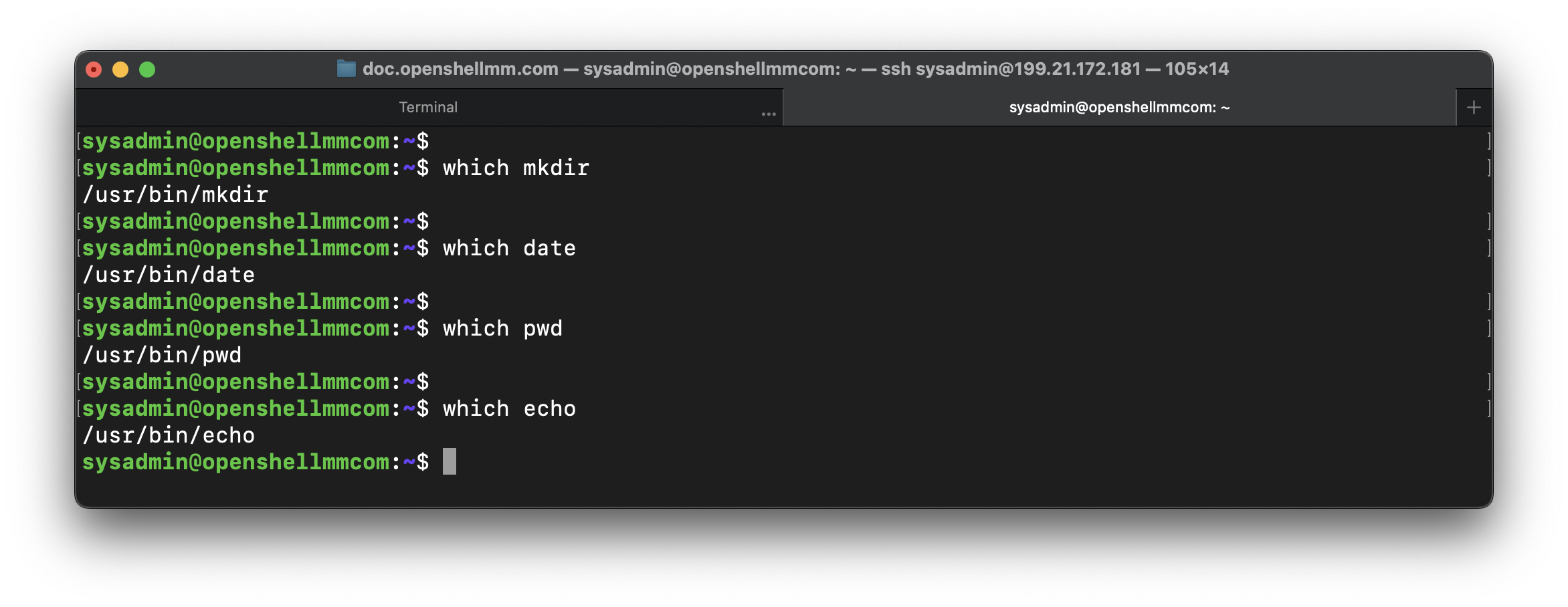
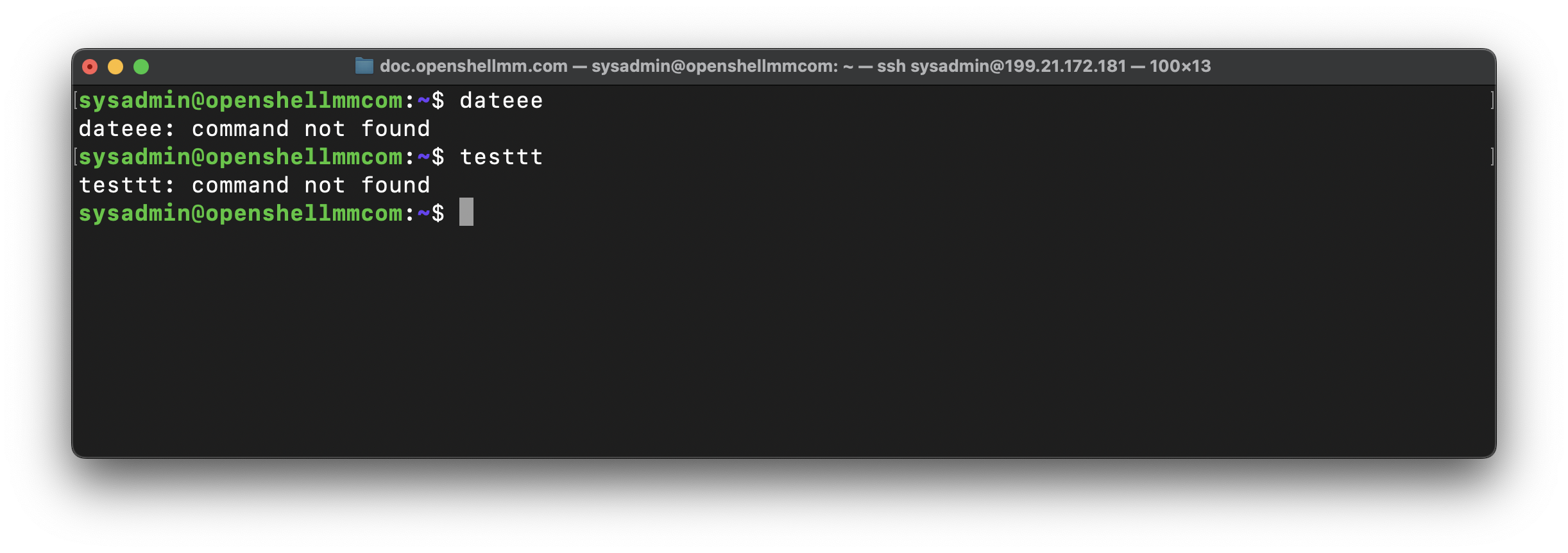
- တစ်ကယ်လို့ user က command တစ်ခုခုကို မှား ရိုက်တာ ဖြစ်ဖြစ်၊ ဒါမှမဟုတ်
shellရှာဖွေ execute ပြုလုပ်ပေးနိုင်တဲ့ ${PATH} မှာ မရှိတဲ့ command တစ်ခုခုကို execute ပြုလုပ်မိတယ်ဆိုရင်တော့ “command not found” ဆိုပြီး standard error message လေး output ထုပ်ပေးမှာ ဖြစ်ပါတယ်။
Checking the shell type of the current user
- နောက်ပြီး ကိုယ် လက်ရှိ အသုံးပြုနေတဲ့ shell အမျိုးအစားကို သိလိုတဲ့အခါ
echo ${0}ဒါမှမဟုတ်echo ${SHELL}command ကို အသုံးပြုပြီး စစ်ကြည့်နိုင်ပါတယ်။
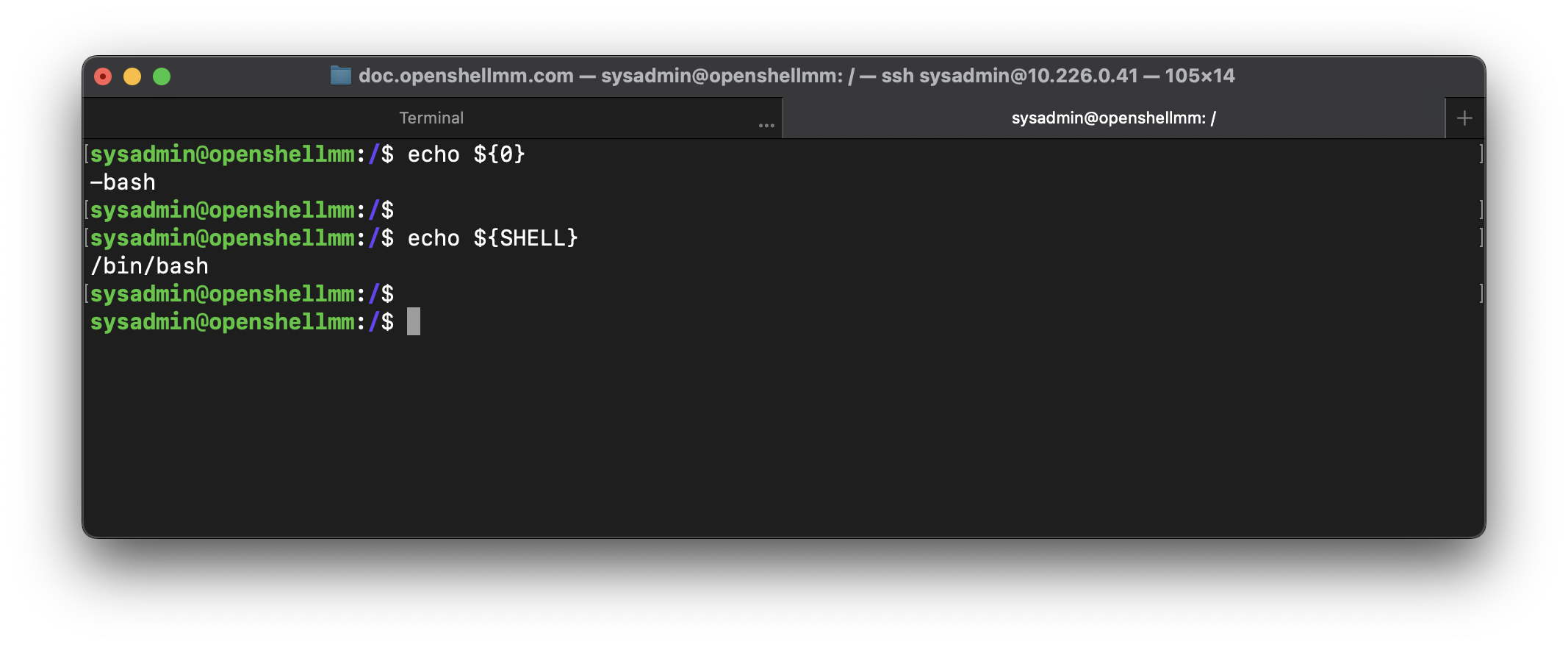
- အထက်ပါ example ကို ကြည့်ချင်းအားဖြင့် လက်ရှိ user အသုံးပြုနေတဲ့ shell သည်
bashshell အမျိုးအစား ဖြစ်ပါတယ်။
Checking the available shell type
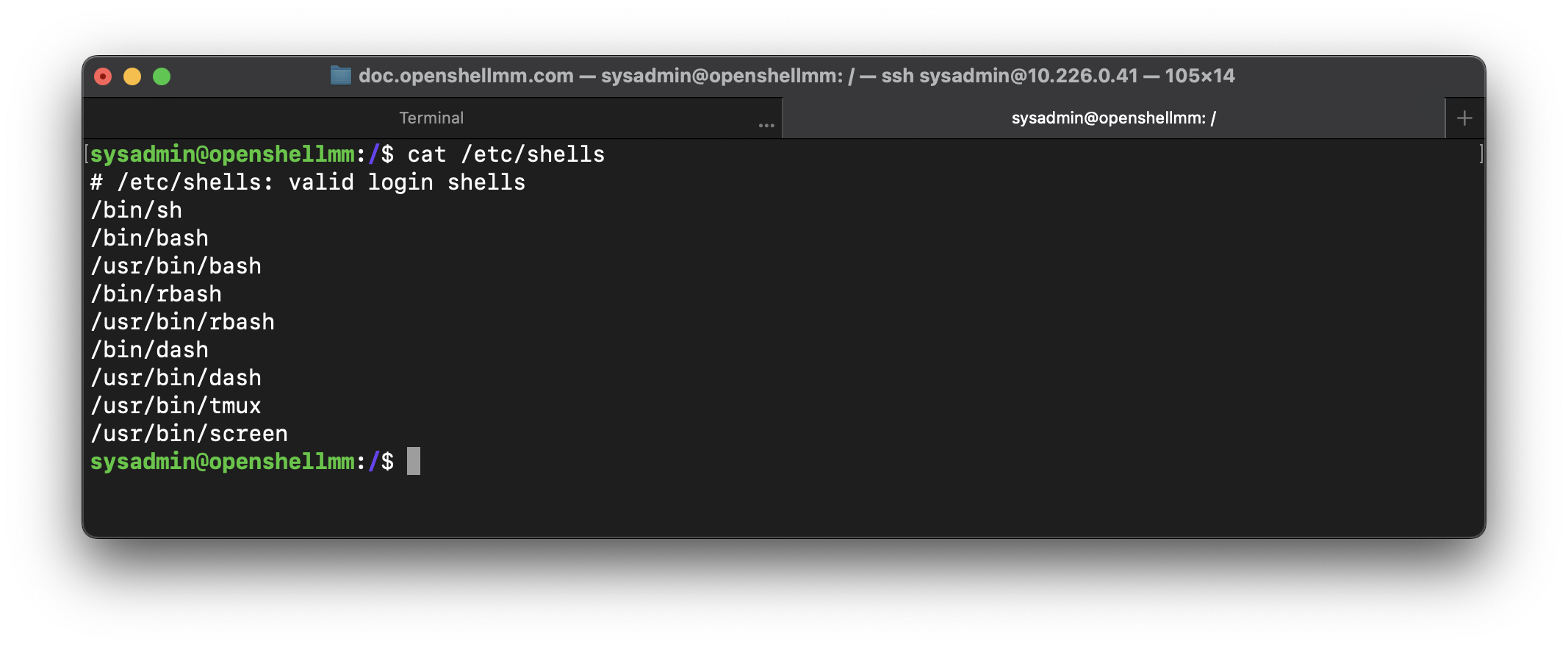
- ကိုယ် အသုံးပြုနေတဲ့ linux system မှာ pre installed ပြုလုပ်ထားတဲ့ shell အမျိုးအစားတွေကို သိလိုတဲ့အခါ
cat /etc/shellscommand ကို အသုံးပြုပြီး စစ်ကြည့်နိုင်ပါတယ်။
- ကိုယ်လက်ရှိအသုံးပြုနေတဲ့ Shell အမျိုးအစား တစ်ခုက နေ တစ်ခြား Shell အမျိုးအစား တစ်ခုကို ပြောင်းလဲ အသုံးပြုချင်တဲ့အခါ ကိုယ်ပြောင်းလဲ အသုံးပြုချင်တဲ့ shell name ကို execute ပြုလုပ်ပြီး အလွယ်တကူ ပြောင်းလဲ အသုံးပြုနိုင်ပါတယ်။
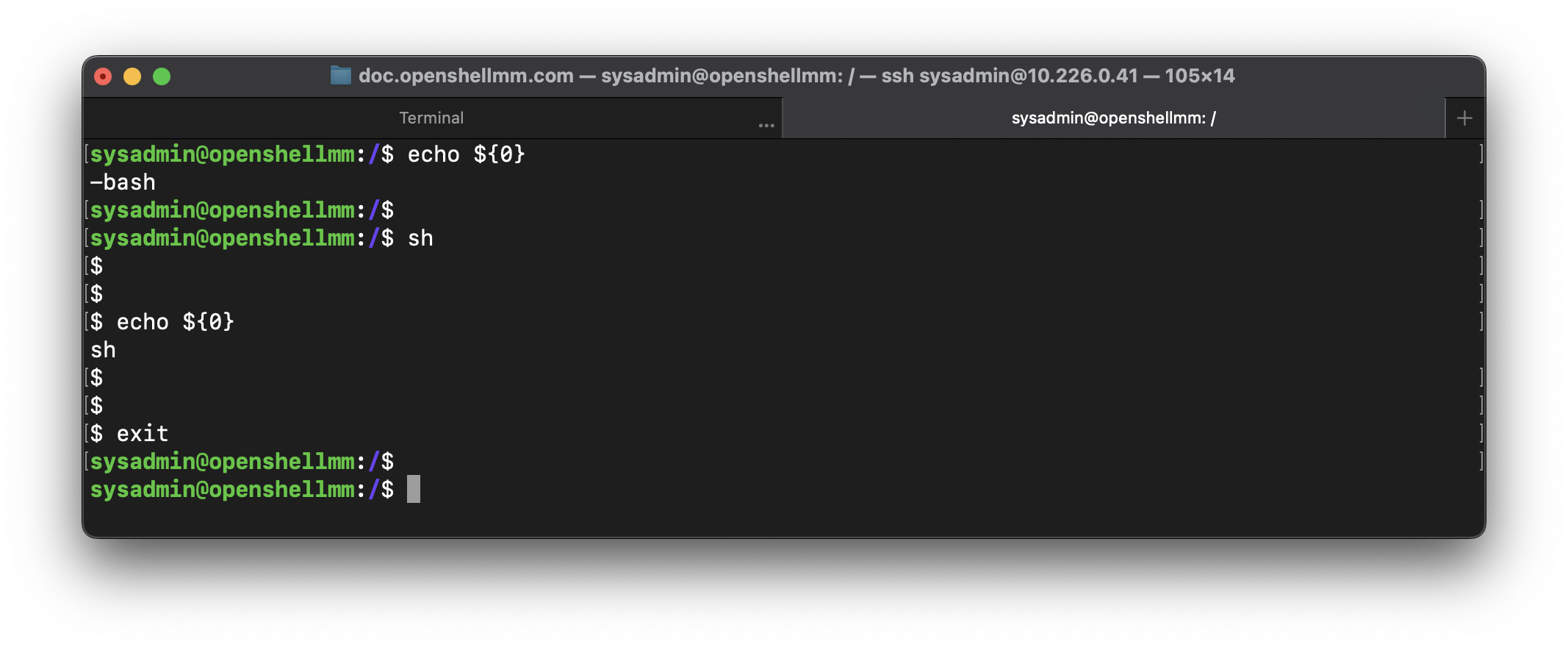
- အပေါ်က example မှာဆိုရင်
echo ${0}command ကို အသုံးပြုပြီး လက်ရှိအသုံးပြုနေတဲ့ shell အမျိုးအစားကို စစ်ကြည့်ပါတယ်။ လက်ရှိအသုံးပြုနေတာကbashအမျိုးအစား ဖြစ်ပါတယ်။shshell ကို ပြောင်းလဲ အသုံးပြုချင်တာ ဖြစ်တဲ့အတွက်ကြောင့် shell nameshကို ရိုက်ပြီး ပြောင်းလဲ temporarily ပြောင်းလဲ အသုံးပြုနိုင်ပါတယ်။ အသုံးမပြုလိုတဲ့အခါexitcommand ကို အသုံးပြုပြီး ပြန်ထွက်နိုင်ပါတယ်။
Type of Shells
- Linux OS မှာ အကြမ်းမျဥ်းအားဖြင့် shell အမျိုးစား (၂) မျိုး ပါဝင်ပါတယ်။
- Bourne Shell
$သည် Bourne Shell ရဲ့ Default Prompt ဖြစ်ပါတယ်။
- C shell
%သည် C shell ရဲ့ Default Prompt ဖြစ်ပါတယ်။
- Bournce Shell မှာ လည်း အောက်ပါ အမျိုးအစားခွဲတွေ ရှိသေးတယ်။
- Bournce Shell (sh)
- Korn Shell (ksh)
- Bourne-Again Shell ( bash )
- Shell အမျိုးအစား တော်တော်များကို
/binဒါမှမဟုတ်/usr/binအောက်မှာ pre installed ပြုလုပ်ထားတာကို တွေ့နိုင်ပါတယ်။ - Bournce Shell (sh)
shshell က တော့ နှစ် အတော် ကြာကြာUnixoperating system တွေမှာ ကတည်းက အသုံးများတဲ့ shell အမျိုးအစား တစ်ခု ဖြစ်ခဲ့ပါတယ်။ Bell Labs က Stephen Bourne ကနေ developed ပြုလုပ်ခဲ့တာ ဖြစ်ပါတယ်။standard shellလို့လည်း ခေါ်ခဲ့ပါသေးတယ်။
- Bourne-Again-Shell ( Bash )
Bashshell ကတော့shကို enhanced ပြုလုပ်ထားတဲ့ version ဖြစ်ပါတယ်။shshell မှာတုန်းက မပါဝင်ခဲ့တဲ့ added-on features တွေ ပါဝင်လာပါတယ်။
Bashshell မှာဆိုရင်shshell မှာတုန်းက မပါဝင်ခဲ့တဲ့ features တွေ ဖြစ်တဲ့- Command History
- Command Alias
- Tab Completion
- Job Control
- Command-Line Editing စတဲ့ features တွေ ပါဝင်လာခဲ့ပါတယ်။
-
ဒါကြောင့် Bash ( Bourne-Again Shell ) ကတော့ အသုံးအများဆုံး၊ Popular အဖြစ်ဆုံး ဖြစ်ပြီး Linux Distribution တော်တော်များများမှာ Default အနေနဲ့ Pre-Installed ပါဝင်တာ ဖြစ်ပါတယ်။
- နောက်ထပ် Shell အမျိုးအစား တစ်ခုကတော့ Zsh ( Z shell ) ပဲ ဖြစ်ပါတယ်။ Zsh shell ကလည်း bash ပေါ်မှာ အလုပ် လုပ်တာ ဖြစ်ပြီး bash shell ထက် additional features တွေ ပိုမို စုံလင်စွာ ပါဝင်တာ ဖြစ်ပါတယ်။
- macOS နဲ့ Kali Linux တို့မှာတော့ zsh shell ကို default shell အနေနဲ့ အသုံးပြုတာ ဖြစ်ပါတယ်။
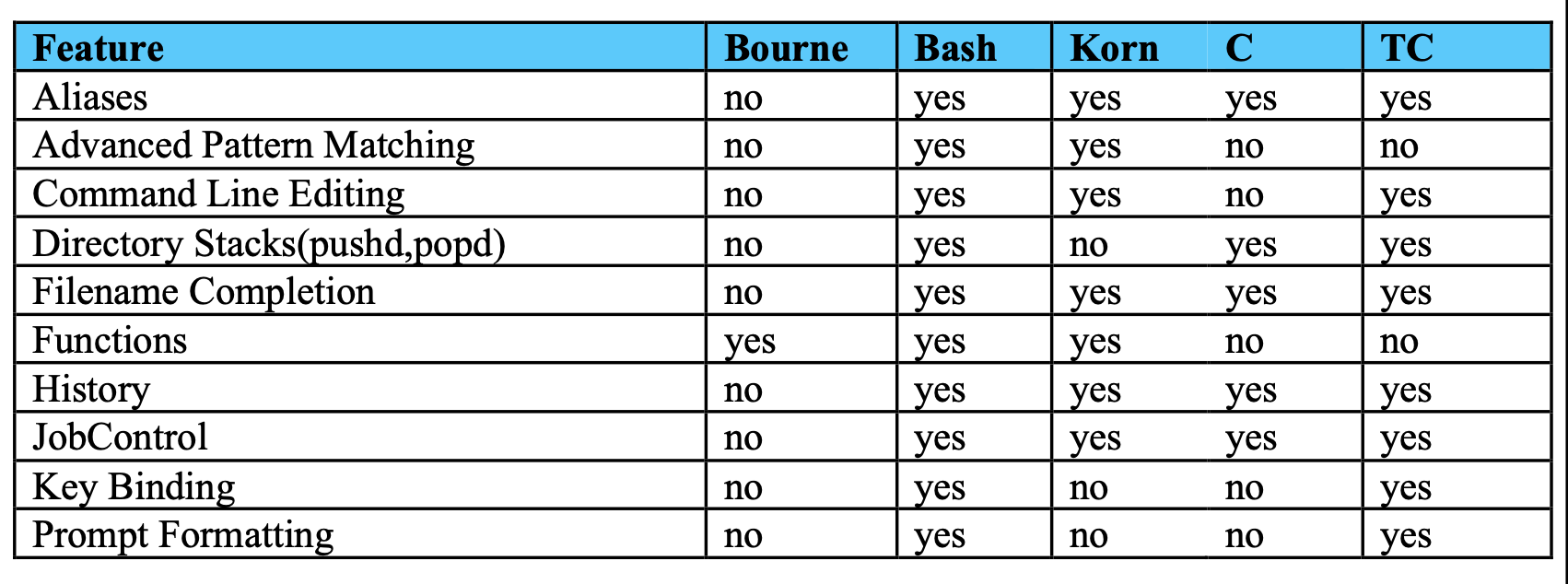
Comparison between Shells
- ကဲ ဒီလောက်ဆိုရင်တော့
shellနဲ့ ပတ်သတ်ပြီး နားလည် လောက်ပြီလို့ ထင်ပါတယ်။
This post is licensed under
CC BY 4.0
by the author.